

Invoices in seconds.
From the first order to the last payment, every sale is in one place. Type an invoice with the keyboard alone, print it on any printer, or send it to the customer as a PDF. Stock and accounts update by themselves.
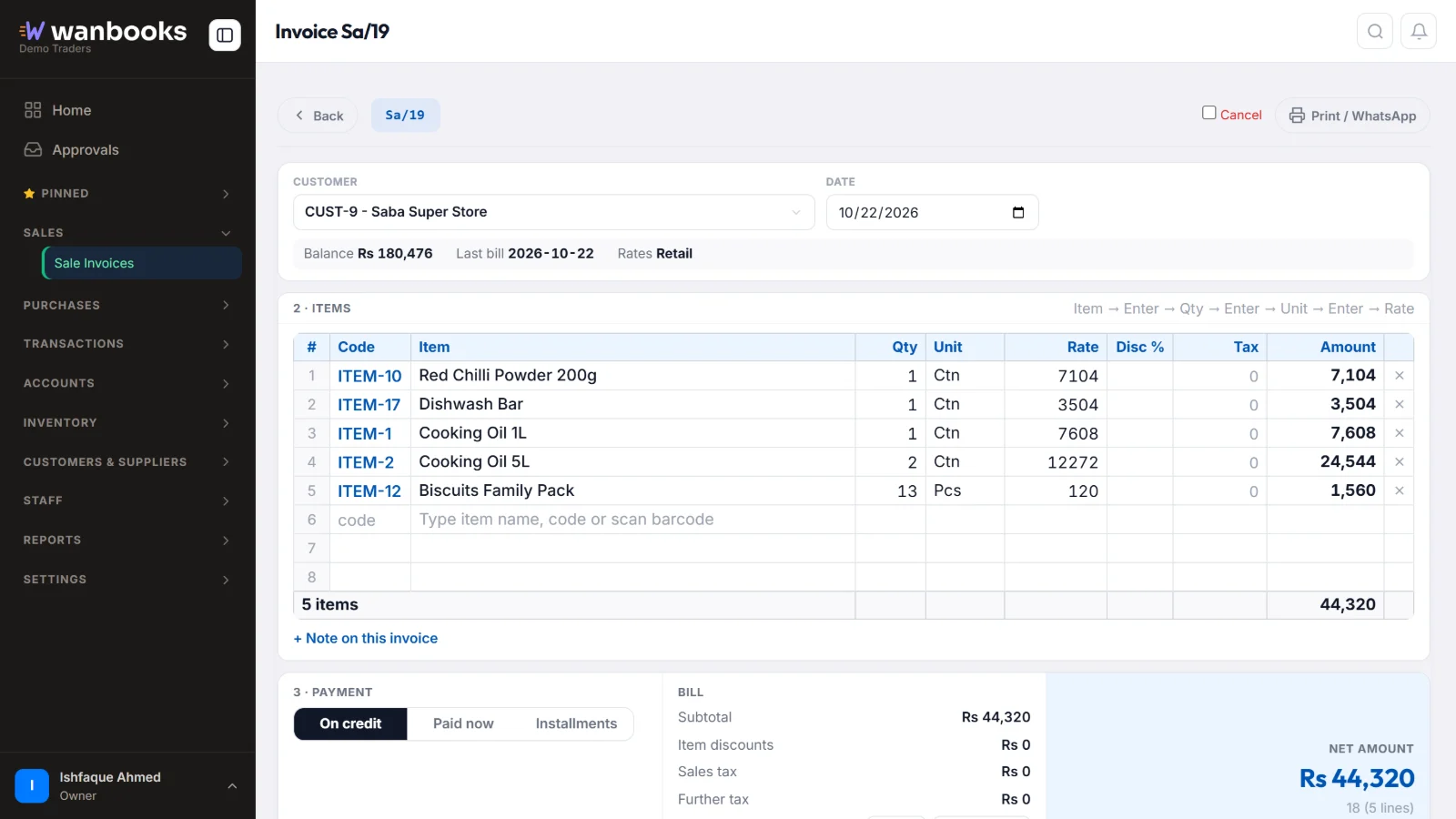
Sample data from a demo company.
A sale invoice in Wanbooks
Item, quantity, unit and rate in one grid you can fill from the keyboard.
| Ahsan Traders | Salesman: Imran · Credit 15 days | 22-Oct-2026 |
| Cooking oil 5L | 6 pcs × 2,950 | 17,700 |
| Basmati rice 10kg | 4 bags × 3,400 | 13,600 |
| Tea 950g | 12 pcs × 1,445 | 17,340 |
Everything a sale needs
Each part works with the others, so nobody types the same thing twice.
- Orders to invoicesTake a sale order in the office or from the Booker app, then turn it into an invoice in one step. Make the invoice before dispatch or after delivery, as you prefer.
- Fast, keyboard-first entryEnter moves to the next box, arrows move in the grid, Ctrl+S saves. The customer's last rate fills in by itself. Works just as well on a phone.
- Returns against billsTake goods back against the bill they came on. The customer's balance, the stock and the accounts are corrected together.
- Cash sales and walk-in customersTick "Paid now" on any invoice and the receipt is made with it. Sell to walk-in customers without opening an account for them.
- Price groups and taxSeparate rates for retail, wholesale and distributor customers. Sales tax and further tax added to invoices.
- Print or send as PDFPrint on A4, A5 or thermal receipt paper, or send the invoice to the customer as a PDF on WhatsApp in one tap.
The details
Items and units
- Sell by piece, box, carton or any unit
- Enter the rate for one packing; the piece rate is worked out
Customers
- Credit limits and credit days
- Salesman on every invoice
- Schemes and reward points
Reports
- Sales register
- Sales by product, customer, salesman and area
- Monthly sales and top analysis
About sales
Can I make invoices on my phone?
Yes. Wanbooks opens in the browser on any phone or computer. The invoice screen fits a phone screen, and on a computer it works fully from the keyboard.
Can I change an invoice after saving it?
Yes, through Edit, Cancel or a Return. A saved invoice never changes silently, so the stock and the accounts always match.
Does the customer get the invoice on WhatsApp?
Yes. Send the invoice as a PDF file from the invoice screen, from your company's own WhatsApp number.
See Wanbooks with your own products.
Leave your WhatsApp number.
We'll call or message you to set up a demo.
- +92 333 2392852